- How to use a parking lot?
I DO NOT HAVE A BOOKING – please collect a ticket from the main entrance and park your car in a specific parking zone (A/B/C/D/VIP) – for parking over 6 hours, G – for parking up to 6 hours). Just before departure, pay for your ticket using the designated machines, at the parking office, or online. After payment, you have 15 minutes (parking zone A/B/C/D/G/VIP) and 10 minutes (Kiss&Fly zone) to leave the airport. Zone markings and pricing are available on the website https://www.airport.wroclaw.pl/pasazer/odwoze-odbieram/parking/
I HAVE A BOOKING – Please review your parking reservation confirmation, which can be downloaded from the email. The voucher includes zone designations and entry instructions. If an unexpected error occurs and the barrier at the main entrance does not open as instructed, please collect a ticket at the main entrance, park in the purchased zone, and take your ticket and reservation to the parking office
- How to book parking?
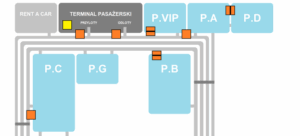
Visit https://www.airport.wroclaw.pl/ – parking tab – reserve parking. Parking can be reserved up to 1 hour before your planned arrival time. Information on pricing, directions, maps, and parking zones is available on the airport website. Parking reservations by phone are not available 3. How to edit booking details? ENTRY/EXIT TIME/DATE – You can take advantage of the parking lot entry tolerance, which is available to all reservation holders. This allows you to enter the parking lot up to 5 hours before your scheduled entry time. REGISTRATION NUMBER – If the car you booked has broken down, or if there’s a typo in the registration, scan the QR code (from your booking confirmation, which can be downloaded via email) at the main entrance. Registration changes can be made in the booking system at https://rezerwacja.airport.wroclaw.pl/get/ EXIT TIME/DATE (EXTENSION) – the possibility of paying extra for the exceeded reservation time is available at the devices intended for this purpose (marked on the map below) or at the parking office
3. How do I check which parking lot I have booked?
Please review your parking reservation confirmation, which can be downloaded via email. The voucher includes zone markings and entry instructions. The numbers and letters in the reservation number are random
4. I didn’t receive confirmation of my booking
You can download the booking confirmation yourself from the form available at https://rezerwacja.airport.wroclaw.pl/get/
5. How can I cancel my booking?
Please send an email to [email protected] requesting withdrawal from the contract. Please review the details and cancellation policy in the terms and conditions available.
6. How to file a complaint?
Complaints can be submitted via the complaint form available at parking-reklamacje.airport.wroclaw.pl, at the parking office, or by traditional mail. We have 14 calendar days to respond to your complaint.